

Don't know anything about new releases or feel intimidated about reviewing records for WPRB? Don't be. It is so easy that even a simp like myself can pull it off. There are tons of new records that come into WPRB every week and most of them deserve a home in the WPRB rock library. However, with more Cds than reviewers, consistently reviewing Cds is the only way WPRB can be kept up to date. Follow along and be stunned by the ease with which you can participate:
1. Go down to the music offices and ask about new releases. If the offices aren't open, email the music director[s] and ask when you can get in to grab some releases.
2. Once inside the offices, look around the piles of Cds waiting to be reviewed. How you decide what to review is up to you. Pick some Cds that you are familiar with. Pick some Cds on labels that you like or pick records that just look/sound interesting to you. Your call. Some of the best records I've reviewed have been from bands I was unfamiliar with. Going by cover art isn't a bad place to start. Seriously.
3. While in the music offices, get some white stickers to review with. You'll need these later...
You have a handful of Cds now. What next? How do I write reviews about bands I don't know anything about? The key, honestly, is faking knowledge. There is plenty of information out there if you look. You don't have to know every tiny detail of rock and roll history to write a good review.
1. Find press releases for these records in the music offices. Most if not all record labels send biographies, press releases and/or press clips on their records to radio stations so that people can learn a bit about their releases. There is always great information to be gleaned from these press kits, either in the form of comparisons to other bands, interesting facts about other bands these members might have be in or other information that DJs could use.
2. Look in the stacks for older releases by these bands whose Cds you are holding. Older reviews on other releases can sometimes help provide needed information.
3. The internet! I can't think of a better way to find out information about records than the internet. If the label doesn't have a web site listed on the Cd that might contain information on a band, try the following web sites:
http:www.allmusic.com
-nearly every record and band is on there in some form. I use this site for any review of a band I'm not familiar with. It helps incredibly. A must to bookmark, I feel.
http://www.insound.com
-uses the above search engine but is organized by release. Plus, you can order Cds there and they advertise on WPRB. So support a sponsor!
4. Look on the inside booklet of the Cd for information you can use in your review. Obvious, but often overlooked, especially for cover songs and guest musicians.
Ok. I've learned something about these bands and their Cds. I'm back in my dorm/apartment/somewhere my Cd player is. What now?
1. Put a white sticker in the upper left of the Cd booklet. Not on the glass, but ON THE BOOKLET ITSELF. Write the band name in the upper left of this sticker. Write the Cd title in the lower left of this sticker. Put the date you reviewed this Cd in the upper right. See any Cd in the WPRB library to get what I'm talking about. Click here for an example.
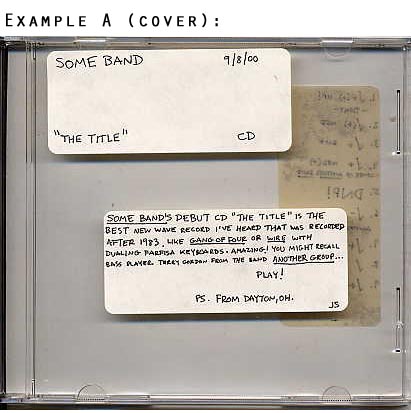
2. Enough pregame! Listen to the Cd! Write a paragraph [more if you choose] about the Cd you are listening to. Think Zagat's but dealing with records, not restaurants. Who is this band? Where are they from? What do they sound like? What number release is this for them? Is there anything about them DJs should know? Don't be afraid to voice your opinion in your review. As I learned first-hand WPRB is sometimes an intimidating place, but feel free to state how you feel. People are interested in reading your opinions. Oh, and put your review on a sticker on the front of the Cd booklet please, not on the jewelcase glass. Click here for an example.
3. Initial your review so people get to know your reviews. There are decades of old reviews of people I've never met whose words I respect because I enjoyed a record they reviewed once and trusted their opinion on other releases they had reviewed. Click here for an example.
See the fake "reviewed Cd" mockup cover here for additional details.
My review is finished. I've noticed every record at WPRB has weird marks and codes on the backs of them. What is up with that?
Every record at WPRB has a track-by-track "rating" that goes with the review. These ratings are hard to figure at first, but easy to handle once you get a hang of the "system".
1. On another white sticker, number each song and put a check rating next to it.
Click here for an example. From this point on, when you see the word "Check", imagine a check mark in pen which my keyboard can not render a good representation of.
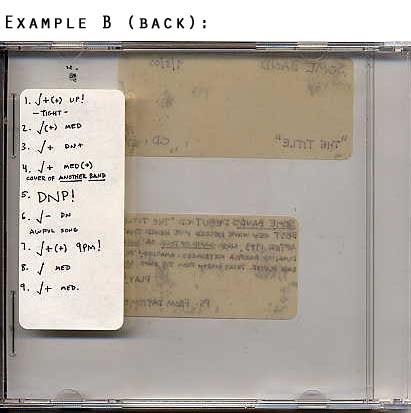
Check ratings give you an indication as to how reviewers liked particular songs. When I write reviews, I try and think of how each song would sound on the radio rather than the record as a whole.
Check+ is a good song you would play on the radio.
Check(+) is a decent song that you wouldn't be as likely to play as a Check+.
Check is pretty fair. Not worth your time.
Anything below that [Check-, etc.] is pretty dreadful in the reviewer's eyes.
If something is stellar and knocks off your socks, you can go above Check+ to Check+(+), Check++, CheckCheck, etc. Everyone has their own variations on this system. Look at other Cds that have been reviewed for a better idea of how this works.Click here for an example.
Also important:
If a song has cursing in it, please indicate as such with a 9PM!, 12AM! or DNP! [Do Not Play] rating. Ask the music directors to explain these rules to you. I'm trying to keep this guide simple, after all.
If the break between two songs on a Cd is tight or nonexistent, please indicate as such.
Better to prepare someone who is going to be playing this release than leaving them in the lurch.
2. Next to each check rating, please indicate a song's tempo.
Is a song:
Up - Super fast, like hardcore or speed metal.
Med - Most rock songs are this speed.
Dn - Slooooooooow.
This gives DJs an idea of what they are getting into if they have not previewed a record.
See my fake "reviewed Cd" mockup back to review the details.
My pile of Cds is now reviewed, where do I take them?
Return to WPRB.
Write "WPRB" on the Cd face and all over the artwork with magic marker to avoid the rare case of theft. (Theft from WPRB is the worst crime one can commit.) Make sure you use magic marker as regular pens can damage compact discs beyond repair.
There is a sign-up sheet outside the broadcast studio. You can add your new releases there [list artist, title, date and label] and then put a white sticker on the spine before you place the Cd in the New Emphasis [NE] section.
For Cds that are not new releases [either things that WPRB has purchased to fill gaps in the rock library or things that were released a long time ago but only added recently], put a red sticker on the spine and indicate the original release year on the "title/date" sticker on the Cd booklet. These Cds are Old Emphasis [OE] Cds and they go on the shelf above the New Emphasis [NE] Cds in the broadcast studio.
Anything else?
Have a good time, learn about some new music and realize that WPRB would otherwise collapse under the weight of hundreds of new Cds, so your help is appreciated. If you have any questions, please ask someone. I hope this guide was as simple as I intended it to be. Reviewing records is real easy. Trust me.
Thanks for reading.
Jon Solomon
January 2001
Princeton, New Jersey
How to review records | Internet resources | DJ tips | Index